

Passing dynamic data to your Drupal Views is one of the most powerful ways to build flexible, content-rich websites. Whether you are building a related-articles block, a user profile dashboard, or a filtered product catalog, understanding how to pass Drupal Views contextual filters via the URL is essential. If you have ever wondered why your GET parameters aren't being picked up or how to structure your URL paths for filtering, this guide is for you.
In this tutorial, we will explore the different ways to provide arguments to your Views, ranging from standard URL paths to query parameters using the Better Exposed Filters module. We will also dive into best practices and common pitfalls to avoid when working with contextual filters in Drupal 9 and 10.
Understanding Contextual Filters vs. Exposed Filters
Before we dive into the technical implementation, it is important to understand the distinction between contextual filters and exposed filters. While both serve to narrow down the results of a View, they operate differently in terms of user interaction and URL structure.
Exposed filters are typically intended for the end-user. They provide UI elements like dropdowns, checkboxes, or text fields that allow users to search and sort data. These filters traditionally append query strings to the URL, such as ?category=123.
Contextual filters, on the other hand, are often "hidden" from the user interface. They rely on context—such as the ID of the node currently being viewed or a specific segment of the URL path—to filter the results. By default, contextual filters in Drupal do not use GET variables; they use the URL path structure itself.
Passing Arguments via the URL Path
One of the most common points of confusion for developers is looking for GET variable names (like ?my_filter=val) when working with standard contextual filters. In Drupal's core Views module, contextual filters are not passed as separate variables; they are part of the URL path.
If your View's path is configured as products/category, and you want to filter by a specific category ID (e.g., "10"), the URL would look like this:
example.com/products/category/10
In this scenario, the View expects the argument to follow the base path. If you have multiple contextual filters, they follow in sequence:
example.com/products/category/10/color/blue
How to Configure Path-Based Filters
- Open your View and look for the Advanced column on the right.
- Click Add next to Contextual Filters.
- Select the field you want to filter by (e.g., Content: ID or a Taxonomy term reference).
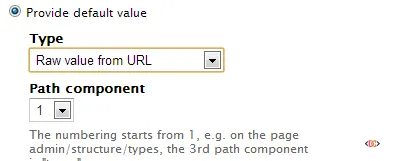
- Under the setting "When the filter value is NOT in the URL," select Provide default value.
- Choose Raw value from URL and specify the path component (e.g., if your path is
/node/123, the ID is component 2).
Using GET Parameters with Better Exposed Filters (BEF)
There are many scenarios where using the URL path is not ideal, especially if you are working with View blocks that appear on multiple pages or if you need to pass multiple optional arguments. If you specifically want to use GET parameters (e.g., ?field_a=valuea), the standard contextual filter system won't work out of the box.
To achieve this, the community often recommends the Better Exposed Filters (BEF) module. This allows you to treat exposed filters like contextual filters but with more control over the URL structure.
Implementation Steps:
- Install and enable the Better Exposed Filters module.
- In your View, add an Exposed Filter (not a contextual filter).
- Check the box Expose this filter to visitors.
- Under the Exposed form section in the middle column, change the Exposed form style to Better Exposed Filters.
- In the BEF settings, you can find options to hide the filter from the UI while still allowing it to accept values from the URL.
- Ensure Use AJAX is enabled if your View is displayed as a block.
Using this method, your URL will look like a traditional search query:
mydomain.com/your-view-path?field_a=valuea&field_b=valueb
Advanced Logic: Providing Default Values via PHP
Sometimes, the logic for your contextual filter is too complex for a simple URL path or a standard default value. In these cases, Drupal allows you to provide a default value using custom PHP code.
Note: Using PHP code inside the Views UI requires the "Views PHP" module or a similar custom solution. However, for modern Drupal sites, it is highly recommended to handle this logic via a custom Argument Default plugin in a custom module to keep your codebase clean and maintainable.
If you are using the PHP approach within the UI for quick prototyping, it looks like this:
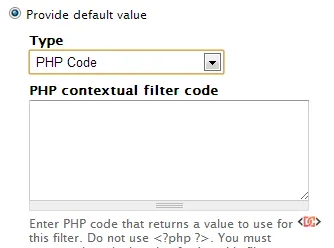
In this configuration, you can write a snippet that programmatically fetches a value from the current session, a cookie, or an external API and passes it to the filter.
Common Mistakes to Avoid
1. Forgetting to Set the "When Filter is Not Available" Action
If a user visits your View path without the argument (e.g., just visiting /products/category), the View may return a "Page not found" (404) or show no results. Always configure the "When the filter value is NOT in the URL" setting. You can choose to show all results, provide a fixed default, or display a "Global: Null" result.
2. Path Component Indexing
When using "Raw value from URL," remember that Drupal's path components are 1-indexed in the UI but can be confusing. For a path like /news/tags/drupal, "news" is component 1, "tags" is component 2, and "drupal" is component 3.
3. Security and Validation
Never trust URL input blindly. Always use the Specify validation criteria section in your contextual filter settings. If you expect a Numeric ID, ensure the validator is set to "Content ID" or "Numeric." This prevents malicious users from injecting unexpected strings into your queries.
Frequently Asked Questions
Can I pass multiple values to a single contextual filter?
Yes. In the filter settings, look for the "More" fieldset at the bottom and check the box Allow multiple values. This allows you to pass values separated by commas (for AND logic) or plus signs (for OR logic) in the URL, such as /products/category/10,11,12.
Why isn't my contextual filter working on a Block display?
Blocks do not have their own unique URL path like Page displays do. Therefore, they cannot automatically "grab" arguments from their own path. You must configure the block to "Provide default value" from the "Raw value from URL" of the page the block is currently sitting on.
Is it better to use a Contextual Filter or an Exposed Filter?
Use a Contextual Filter if the filtering is mandatory for the page logic (e.g., a list of nodes by a specific author). Use an Exposed Filter if you want the user to have the ability to change the filter criteria themselves via a form.
Wrapping Up
Mastering Drupal Views contextual filters allows you to create highly dynamic, context-aware layouts that respond to user navigation. While the default behavior uses the URL path, tools like Better Exposed Filters provide the flexibility to use GET parameters when needed.
Always remember to validate your arguments and provide sensible defaults to ensure your site remains both secure and user-friendly. By combining these techniques, you can handle almost any dynamic content requirement in Drupal.