As a developer or stakeholder in the Sitecore ecosystem, your insights are invaluable for the evolution of the Digital Experience Platform (DXP). Whether you have identified a bug, discovered a gap in the documentation, or have a revolutionary idea for the product roadmap, knowing how to communicate that information effectively is crucial.
Providing Sitecore feedback isn't just about reporting issues; it is about participating in the growth of the platform. By using the right channels, you ensure your voice reaches the product teams, engineers, and strategists who can implement change. This guide outlines the most effective methods for submitting both technical and general feedback to Sitecore.
Leveraging Support and Official Portals
The most formal way to submit a product request or report a specific issue is through the Sitecore Support portal. While many developers view this strictly as a place for troubleshooting, it is also a primary intake channel for product enhancements.
You can access the portal at support.sitecore.com. When submitting a ticket that isn't a technical error, you can categorize it as a feature request or product feedback. This ensures it is logged in Sitecore's internal tracking systems.
Additionally, Sitecore maintains a general "Contact Us" page on their main website. While this page is frequently monitored by sales teams, it does provide a phone number (+1 855-748-3267) and a contact form. Note that for technical deep-dives, this is generally the least effective route, as it is designed for lead generation and high-level corporate inquiries.
Partner and Customer Success Channels
If you work for an organization that is a Sitecore Partner or a direct Customer, you have access to dedicated human resources designed to facilitate communication. These roles are often your most powerful advocates within the company.
Customer Success Managers (CSM)
For customers, your CSM is your direct link to Sitecore. They are responsible for ensuring you get the most value out of your investment. If you have feedback regarding the platform's direction or usability, schedule a session with your CSM. They have the internal leverage to escalate feedback to product owners.
Partner Managers
Sitecore Partners have access to the Partner Portal. Within this ecosystem, Partner Managers work closely with agencies to understand market challenges. Providing feedback through your Partner Manager ensures that your insights are framed within the context of the broader market and delivery ecosystem.
The Sitecore Collaborative Program
For those who want to influence the product roadmap in a more granular way, the Sitecore Collaborative Program (SCP) is an essential resource. This program was specifically created to identify market problems and gather detailed feedback on Sitecore products.
By participating in this program, you can share insights on specific challenges and influence product design based on your business needs. It is a unique opportunity to interact with the Product and Development teams directly.
The team manages general feedback and inquiries regarding the program through a dedicated email: [email protected]. This is an excellent channel for long-form feedback that doesn't necessarily fit into a standard support ticket.
Real-time Technical Feedback via Community Slack
In many cases, the fastest way to get your feedback in front of a Sitecore employee is through the community Slack channels. This is particularly true for technical feedback or "quality of life" improvements for developers.
Sitecore employees, including Product Managers and Developer Advocates, are highly active in the Sitecore Slack. By posting in product-specific channels like #sxa, #content-hub, or #headless, you can engage in a dialogue rather than just sending a one-way message.
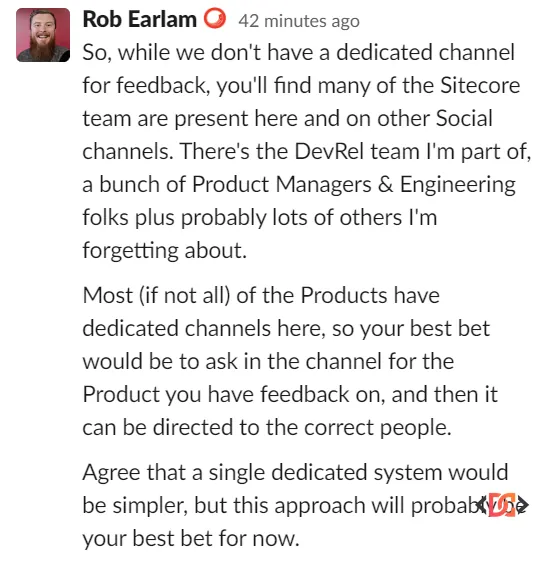
As noted by industry veterans, while there may not always be a single "Technical Feedback Portal," the Slack community serves as a vital bridge. Engaging in these threads allows you to gather support from other community members, which often gives your feedback more weight when it reaches the internal product teams.
Documentation and Knowledge Base Feedback
Sometimes, your feedback is specifically about the clarity of Sitecore's documentation. Sitecore has made it significantly easier to submit these types of corrections in recent years.
- KB Articles: On most Knowledge Base (KB) posts, there are feedback buttons or "Was this helpful?" prompts. Use these to report outdated information or confusing steps.
- Documentation Portal: On the official documentation site, look for the "Feedback" or "Edit on GitHub" options. Many modern Sitecore documentation sets allow you to submit suggestions directly, helping the entire community benefit from your expertise.
Frequently Asked Questions
What is the best way to request a new feature in Sitecore?
The most effective way is to go through your Customer Success Manager (CSM) or submit a product enhancement request via the Sitecore Support portal. This ensures the request is officially logged and tracked.
Is the Sitecore "Contact Us" form good for technical feedback?
Generally, no. The "Contact Us" form is primarily a sales and marketing channel. For technical feedback, use the Sitecore Slack channels or the Support portal to ensure your message reaches the engineering teams.
How do I join the Sitecore Collaborative Program?
You can express interest in joining or send general product insights to the team at [email protected]. This program is specifically designed for stakeholders who want to provide detailed market and product feedback.
Wrapping Up
Providing feedback to Sitecore is a multi-channel process. For formal requests, the Support portal and Success Managers are your best bet. For real-time technical discussions and community-driven advocacy, the Sitecore Slack remains the most vibrant and responsive environment.
Remember that the landscape of a SaaS-based DXP changes rapidly. As of late 2025, Sitecore continues to refine its feedback loops. Regardless of the channel you choose, being clear, concise, and providing use-case examples will always help your feedback stand out and drive the platform forward.