Achieving a first-byte response time of under 200ms is the gold standard for e-commerce performance. For many Magento 1 developers, however, hitting this target feels like an uphill battle. If you have a clean installation with minimal products and styles but are still seeing response times in the 800ms range, your hardware likely isn't the problem—your configuration is.
In this guide, we will break down the ideal server architecture for Magento 1, explain why common caching layers fail, and show you how to structure a high-performance stack that can scale to millions of pageviews.
Understanding the Performance Gap
When a Magento 1 site responds slowly despite having low traffic and minimal content, the bottleneck is almost always the application bootstrap process. Magento's architecture is heavy; it loads thousands of files and initializes a massive XML configuration tree for every request. Without a robust caching strategy, your server is forced to perform this heavy lifting repeatedly.
To visualize the impact of different caching layers, consider the following response time timeline:
--1.2s--------0.8s-----------------0.6s----------------0.1s--------------0.08s----
  Uncached    Mage default cache   Partial FPC cache   Total FPC cache   Varnish
If you are using Varnish and still seeing 800ms, Varnish is configured incorrectly. A properly tuned Varnish installation should deliver responses in under 100ms (often as low as 10ms) because it bypasses the PHP interpreter and the database entirely for cached pages. If you're hitting 800ms, your requests are likely "passing through" Varnish and hitting the backend every time.
The Ideal Magento 1 Server Stack
There is no "one-size-fits-all" configuration file, but there is a "most-optimum" software stack. For a high-performance environment, you should move away from a basic LAMP (Linux, Apache, MySQL, PHP) setup and toward a distributed architecture.
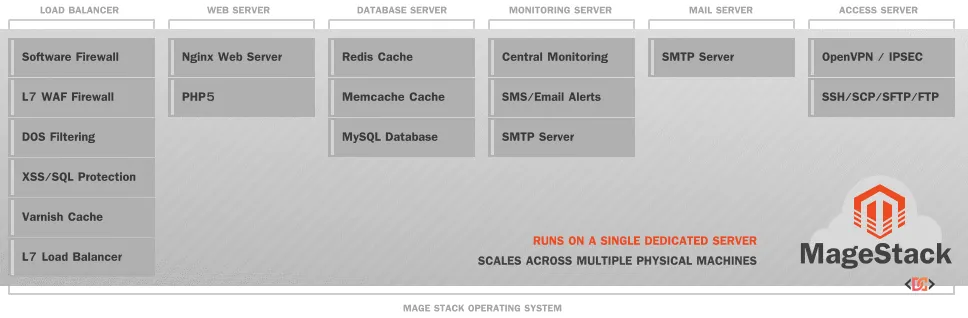
1. The SSL Terminator and Load Balancer
Varnish does not natively support SSL/TLS. To serve your site over HTTPS, you must place an SSL terminator in front of Varnish. Options include Nginx, Pound, or HAProxy. This layer decrypts the traffic and passes it to Varnish over HTTP.
2. Varnish Cache
Varnish sits at the edge of your stack. Its job is to serve pre-rendered HTML to guest users. The moment a user creates a unique session (like adding an item to a cart or logging in), Varnish should hand the request off to the web server.
3. The Web Server: Nginx vs. Apache
While Nginx + PHP-FPM is a popular choice, don't discount Apache with mod_php. In many benchmarks, a properly configured Apache setup is only about 7% slower than Nginx for Magento 1. If your team is more comfortable with Apache, the stability and ease of configuration often outweigh the minor performance gains of Nginx.
4. PHP Optimization (OPcache)
Regardless of your web server, using a modern PHP version (5.4 or 5.5+) with Zend OPcache is mandatory. OPcache stores precompiled script bytecode in shared memory, eliminating the need for PHP to load and parse scripts on each request. This alone can double your execution speed.
Advanced Caching with Redis
For session storage and backend caching, Redis is significantly superior to Memcached for Magento. Unlike Memcached, Redis supports cache tagging, which allows Magento to clear specific cache segments without flushing the entire cache.
To implement Redis effectively, use the following community-proven extensions:
Cm_RedisSession: Handles session storage in Redis to avoid disk I/O bottlenecks.Cm_Cache_Backend_Redis: Replaces the default file-based cache backend.
Avoiding the Redis Saturation Trap
On high-traffic stores (e.g., 500+ orders per hour), Redis can hit memory saturation. When the memory limit is reached, the Least Recently Used (LRU) eviction mechanism can sometimes cause a bottleneck. It is a best practice to use separate Redis instances for sessions and backend cache to allow for independent fine-tuning.
Hardware Allocation Strategy
If you have three dedicated servers at your disposal, do not treat them all the same. Optimize the hardware based on the role of the server:
- Web Servers: Prioritize the fastest possible CPU clock speed and a high core count. Aim for a ratio of at least 2GB of RAM per CPU core.
- Database Server: Prioritize RAM and Disk I/O. The more of your database that can fit into the InnoDB Buffer Pool (RAM), the faster your queries will execute. Use SSDs in a RAID 1+0 configuration for the best balance of speed and redundancy.
A Recommended 3-Server Layout:
- Server 1: SSL Termination -> Varnish -> Nginx/Apache -> PHP-FPM
- Server 2: Nginx/Apache -> PHP-FPM, Redis (Secondary), MySQL Slave
- Server 3: MySQL Master
Common Pitfalls to Avoid
- Ignoring Crawl Bots: "Bad" bots can generate massive uncacheable load by crawling layered navigation. Block these at the Nginx or Varnish level to preserve resources for real customers.
- Excessive 3rd Party Extensions: Every extension adds to the bootstrap time. If an extension is slow or poorly coded, it can bypass your FPC (Full Page Cache) and force a full re-render.
- Network Latency: If your web server and database server are in different data centers, the network "hop" will kill your performance. Ensure all servers are on a low-latency private network (>1Gbps).
Frequently Asked Questions
Why is my Varnish hit rate so low?
This is usually caused by cookies. If your application or a 3rd-party script (like Google Analytics) sets a unique cookie on every request, Varnish may assume the content is private and refuse to cache it. You must configure your Varnish VCL to strip unnecessary cookies before the cache lookup.
Should I use a CDN with Varnish?
Yes. While Varnish handles the HTML, a CDN (Content Delivery Network) should handle your static assets (images, JS, CSS). This offloads significant bandwidth from your origin servers and improves load times for users far from your data center.
Is PHP 5.5 still recommended for Magento 1?
While the original community advice focused on PHP 5.5, modern Magento 1 forks (like OpenMage) support much newer PHP versions (7.4, 8.x). Always use the highest PHP version your specific codebase supports to take advantage of engine-level performance improvements.
Wrapping Up
Getting Magento 1 under 200ms requires a "layered" approach. You cannot rely on hardware alone to solve architectural inefficiencies. By implementing a stack that includes an SSL terminator, Varnish for guest caching, and Redis for backend/session management, you can transform a sluggish 800ms site into a lightning-fast shopping experience. Remember: if it's slow on a clean install, check your Varnish VCL and PHP OPcache settings first.