As a Salesforce developer or administrator, you often find yourself maintaining legacy code. Whether you are refactoring a decade-old Apex trigger or preparing for a major platform migration, you will eventually need to reference a Salesforce Release Note from years ago. Knowing exactly what changed in a specific version is critical when you decide to upgrade the API version of your classes, pages, or components.
Finding current documentation is easy, but finding the specific PDF for a release from 2010 or even 2004 can feel like a scavenger hunt. In this guide, we have compiled the ultimate archive of legacy Salesforce Release Notes and provided the technical methods to map these releases to their respective API versions.
Why You Need Access to Legacy Release Notes
When you encounter an Apex class running on API version 24.0, you aren't just looking at old code; you're looking at code that operates under the platform rules of 2012. Upgrading that class to the latest version (e.g., v61.0) without checking the intervening release notes is a recipe for broken logic.
Salesforce Release Notes provide the context for:
* Behavioral Changes: Changes in how with sharing or without sharing is enforced.
* Deprecated Methods: Identifying which system methods are no longer supported.
* Critical Updates: Understanding security changes that were once optional but are now mandatory.
* New Features: Discovering if a complex workaround in your old code can now be replaced by a native platform feature.
The Complete Archive of Salesforce Release Notes (PDFs)
Salesforce maintains a central help article titled "What’s New in Salesforce?" which serves as the primary repository for older documentation. Below is a comprehensive list of release notes organized by year and version, including the official PDF links and the iconic release mascots associated with them.
Modern Era Releases (2020 – Present)
 * Summer '24 (v61.0): Download PDF
 * Spring '24 (v60.0): Download PDF
 * Winter '24 (v59.0): Download PDF
 * Summer '23 (v58.0): Download PDF
 * Spring '23 (v57.0): Download PDF
 * Winter '23 (v56.0): Download PDF
 * Summer '22 (v55.0): Download PDF
 * Spring '22 (v54.0): Download PDF
 * Winter '22 (v53.0): Download PDF
 * Summer '21 (v52.0): Download PDF
 * Spring '21 (v51.0): Download PDF
 * Winter '21 (v50.0): Download PDF
 * Summer '20 (v49.0): Download PDF
 * Spring '20 (v48.0): Download PDF
 * Winter '20 (v47.0): Download PDF
Classic Lightning Era (2015 – 2019)
 * Summer '19 (v46.0): Download PDF
 * Spring '19 (v45.0): Download PDF
 * Winter '19 (v44.0): Download PDF
 * Summer '18 (v43.0): Download PDF
 * Spring '18 (v42.0): Download PDF
 * Winter '18 (v41.0): Download PDF
 * Summer '17 (v40.0): Download PDF
 * Spring '17 (v39.0): Download PDF
 * Winter '17 (v38.0): Download PDF
 * Summer '16 (v37.0): Download PDF
 * Spring '16 (v36.0): Download PDF
 * Winter '16 (v35.0): Download PDF
 * Summer '15 (v34.0): Download PDF
* Spring '15 (v33.0): Download PDF
* Winter '15 (v32.0): Download PDF
* Summer '15 (v34.0): Download PDF
* Spring '15 (v33.0): Download PDF
* Winter '15 (v32.0): Download PDF
Legacy Documentation (2004 – 2014)
- Summer '14 (v31.0): Download PDF
- Spring '14 (v30.0): Download PDF
- Winter '14 (v29.0): Download PDF
- Summer '13 (v28.0): Download PDF
- Spring '13 (v27.0): Download PDF
- Winter '13 (v26.0): Download PDF
- Summer '12 (v25.0): Download PDF
- Spring '12 (v24.0): Download PDF
- Winter '12 (v23.0): Download PDF
- Summer '11 (v22.0): Download PDF
- Spring '11 (v21.0): Download PDF
- Winter '11 (v20.0): Download PDF
- Summer '10 (v19.0): Download PDF
- Spring '10 (v18.0): Download PDF
- Winter '10 (v17.0): Download PDF
- Summer '09 (v16.0): Download PDF
- Spring '09 (v15.0): Download PDF
- Winter '09 (v14.0): Download PDF
- Summer '08 (v13.0): Download PDF
- Spring '08 (v12.0): Download PDF
- Winter '08 (v11.0): Download PDF
- Summer '07 (v10.0): Download PDF
- Spring '07 (v9.0): Download PDF
- Winter '07 (v8.0): Download PDF
- Summer '06 (v7.0): Download PDF
- Winter '06 (v5.0): Download PDF
- Summer '05 (v4.0): Download PDF
- Winter '05 (v2.0): Download PDF
- Summer '04 (v1.0): Download PDF
- Spring '04: Download PDF
- Winter '04: Download PDF
Why are some releases missing?
If you are searching for Spring '05 or Spring '06, you won't find them. These specific versions were never released. Salesforce confirmed via their documentation team that the release schedule skipped these cycles, so there are no release notes for those periods.
How to Map Releases to API Versions Programmatically
Sometimes you have the release name (like "Winter '13") but you need to know the exact API version (v26.0). Or conversely, you see v35.0 in your metadata and want to know which year that was.
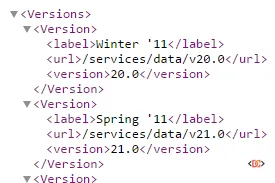
You can use the Salesforce REST API to get a definitive list linking release names to API versions. By navigating to the following endpoint in your browser (while logged into Salesforce) or using a tool like Workbench, you can retrieve an XML or JSON map of all versions from Winter '11 onward:
/services/data/
This endpoint returns a list of all available API versions on your current instance, including their labels and version numbers.
Frequently Asked Questions
How often does Salesforce release new notes?
Salesforce typically releases major updates three times a year: Winter, Spring, and Summer. Release notes are usually published in a "Preview" state several weeks before the actual sandbox and production deployments.
Where can I search for specific keywords across all release notes?
While the PDF archive is great for historical context, you can use the Salesforce Developer Search to search across documentation. However, for legacy releases, downloading the PDF and using Ctrl+F is often the most reliable method.
Should I always upgrade my Apex classes to the latest API version?
Not necessarily. While staying current is a best practice for security and performance, you should only upgrade after reviewing the release notes for every version between your current one and the target. This ensures you can account for any breaking changes in the compiler or platform behavior.
Wrapping Up
Maintaining a healthy Salesforce org requires a deep understanding of where the platform has been. By utilizing this archive of Salesforce Release Notes, you can confidently approach technical debt and API upgrades with the full context of the platform's evolution. Bookmark the official "What's New" page as your primary resource, and use the PDF links above to bridge any gaps in your documentation library.