Developing a professional WordPress plugin involves more than just writing the core logic; you must also manage how your plugin enters and exits a user's ecosystem. Properly handling the plugin lifecycle—activation, deactivation, and uninstallation—is critical for maintaining site performance, ensuring security, and providing a seamless user experience. When a user activates your plugin, they expect a smooth setup; when they uninstall it, they expect their database to be as clean as it was before you arrived.
In this guide, we will explore the technical nuances of the WordPress plugin lifecycle. You will learn how to use hooks safely, handle security checks, and structure your code for different architectural patterns, whether you are using plain functions or Object-Oriented Programming (OOP).
Understanding the Three Pillars of the Plugin Lifecycle
WordPress provides three specific hooks to manage the various stages of a plugin's life. Understanding the difference between these is the first step toward building a robust tool.
- Activation: This hook triggers when a user clicks "Activate" on the plugins page. It is typically used for one-time setup tasks, such as creating custom database tables, setting default options, or flushing rewrite rules.
- Deactivation: This triggers when the plugin is turned off. Crucially, deactivation should not delete user data or settings. It is intended for temporary cleanup, such as clearing cached data or stopping scheduled cron jobs.
- Uninstallation: This is the final stage. When a user deletes the plugin, you must remove everything the plugin created—options, custom tables, and files—to prevent "database bloat."
The Golden Rule: Never Output Data During Hooks
One of the most common mistakes developers make is using echo or print inside activation or deactivation functions. Because WordPress handles these hooks via redirects, any output will trigger a "headers already sent" error. This can lead to the dreaded white screen of death or a warning message from WordPress recommending the user deactivate the plugin immediately. Always keep these functions silent.
Implementing Lifecycle Hooks Safely
Security is paramount when executing setup functions. You must ensure that the person triggering the activation or uninstallation has the proper permissions and that the request is legitimate. This involves checking user capabilities and verifying referrers.
Scenario A: Using Plain Functions
If you are building a simple plugin, you might use plain functions. It is important to define your functions before calling the registration hooks to avoid errors in certain environments.
<?php
defined( 'ABSPATH' ) OR exit;
/**
 * Plugin Name: (WCM) Activate/Deactivate/Uninstall - Functions
 * Description: Example Plugin to show activation/deactivation/uninstall callbacks for plain functions.
 * Author:      Franz Josef Kaiser/wecodemore
 */

function WCM_Setup_Demo_on_activation()
{
    if ( ! current_user_can( 'activate_plugins' ) )
        return;
    $plugin = isset( $_REQUEST['plugin'] ) ? $_REQUEST['plugin'] : '';
    check_admin_referer( "activate-plugin_{$plugin}" );

    # Uncomment the following line to see the function in action
    # exit( var_dump( $_GET ) );
}

function WCM_Setup_Demo_on_deactivation()
{
    if ( ! current_user_can( 'activate_plugins' ) )
        return;
    $plugin = isset( $_REQUEST['plugin'] ) ? $_REQUEST['plugin'] : '';
    check_admin_referer( "deactivate-plugin_{$plugin}" );

    # Uncomment the following line to see the function in action
    # exit( var_dump( $_GET ) );
}

function WCM_Setup_Demo_on_uninstall()
{
    if ( ! current_user_can( 'activate_plugins' ) )
        return;
    check_admin_referer( 'bulk-plugins' );

    // Important: Check if the file is the one
    // that was registered during the uninstall hook.
    if ( __FILE__ != WP_UNINSTALL_PLUGIN )
        return;

    # Uncomment the following line to see the function in action
    # exit( var_dump( $_GET ) );
}

register_activation_hook(   __FILE__, 'WCM_Setup_Demo_on_activation' );
register_deactivation_hook( __FILE__, 'WCM_Setup_Demo_on_deactivation' );
register_uninstall_hook(    __FILE__, 'WCM_Setup_Demo_on_uninstall' );
Advanced Architectures: Class-Based Implementation
Modern WordPress development favors Object-Oriented Programming. Using a class helps namespace your functions and keeps your global scope clean. This pattern is highly recommended for larger plugins.
Scenario B: The Standard Class Pattern
When using a class, you pass an array to the registration hooks containing the class name and the method name.
<?php
defined( 'ABSPATH' ) OR exit;
/**
 * Plugin Name: (WCM) Activate/Deactivate/Uninstall - CLASS
 * Description: Example Plugin to show activation/deactivation/uninstall callbacks for classes/objects.
 */

register_activation_hook(   __FILE__, array( 'WCM_Setup_Demo_Class', 'on_activation' ) );
register_deactivation_hook( __FILE__, array( 'WCM_Setup_Demo_Class', 'on_deactivation' ) );
register_uninstall_hook(    __FILE__, array( 'WCM_Setup_Demo_Class', 'on_uninstall' ) );

add_action( 'plugins_loaded', array( 'WCM_Setup_Demo_Class', 'init' ) );
class WCM_Setup_Demo_Class
{
    protected static $instance;

    public static function init()
    {
        is_null( self::$instance ) AND self::$instance = new self;
        return self::$instance;
    }

    public static function on_activation()
    {
        if ( ! current_user_can( 'activate_plugins' ) )
            return;
        $plugin = isset( $_REQUEST['plugin'] ) ? $_REQUEST['plugin'] : '';
        check_admin_referer( "activate-plugin_{$plugin}" );
    }

    public static function on_deactivation()
    {
        if ( ! current_user_can( 'activate_plugins' ) )
            return;
        $plugin = isset( $_REQUEST['plugin'] ) ? $_REQUEST['plugin'] : '';
        check_admin_referer( "deactivate-plugin_{$plugin}" );
    }

    public static function on_uninstall()
    {
        if ( ! current_user_can( 'activate_plugins' ) )
            return;
        check_admin_referer( 'bulk-plugins' );

        if ( __FILE__ != WP_UNINSTALL_PLUGIN )
            return;
    }

    public function __construct()
    {
        # INIT the plugin: Hook your callbacks
    }
}
Scenario C: External Setup Files
For complex plugins, you might want to move your setup logic into a separate file (e.g., inc/setup.php). This keeps the main plugin file lightweight. By using glob(), you can dynamically include these files during the plugins_loaded action.
Handling Requirements: PHP Versions and Extensions
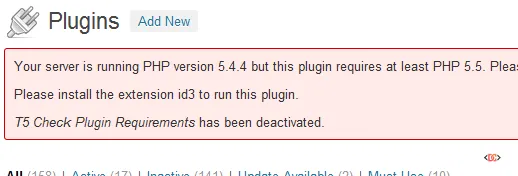
Before your plugin even activates, you should verify that the server meets your technical requirements. If a plugin requires PHP 8.1 but the server is running 7.4, the plugin might throw a fatal error. You can prevent activation and display a helpful error message using admin_notices.
<?php
/**
 * Plugin Name: T5 Check Plugin Requirements
 * Description: Test for PHP version and installed extensions
 */

if ( ! empty ( $GLOBALS['pagenow'] ) && 'plugins.php' === $GLOBALS['pagenow'] )
    add_action( 'admin_notices', 't5_check_admin_notices', 0 );

function t5_check_plugin_requirements()
{
    $php_min_version = '5.4';
    $extensions = array ( 'iconv', 'mbstring', 'id3' );
    $errors = array ();
    $php_current_version = phpversion();

    if ( version_compare( $php_min_version, $php_current_version, '>' ) )
        $errors[] = "Your server is running PHP version $php_current_version but this plugin requires at least PHP $php_min_version.";

    foreach ( $extensions as $extension )
        if ( ! extension_loaded( $extension ) )
            $errors[] = "Please install the extension $extension to run this plugin.";

    return $errors;
}

function t5_check_admin_notices()
{
    $errors = t5_check_plugin_requirements();
    if ( empty ( $errors ) ) return;

    unset( $_GET['activate'] );
    $name = get_file_data( __FILE__, array ( 'Plugin Name' ), 'plugin' );

    printf(
        '<div class="error"><p>%1$s</p><p><i>%2$s</i> has been deactivated.</p></div>',
        join( '</p><p>', $errors ),
        $name[0]
    );
    deactivate_plugins( plugin_basename( __FILE__ ) );
}
Managing Plugin Updates and DB Migrations
WordPress does not have a native "on update" hook that runs automatically. To handle database changes between versions, you should implement a version-check routine that runs on admin_init. By comparing the version stored in the database with the current plugin version, you can trigger migration scripts precisely when needed.
function prefix_upgrade_plugin()
{
    $v = 'plugin_db_version';
    $current_db_version = get_option( $v );

    // Upgrade to version 2
    if ( '2' !== $current_db_version )
    {
        // Perform migration logic here...
        update_option( $v, '2' );
    }
}
add_action('admin_init', 'prefix_upgrade_plugin' );
Frequently Asked Questions
Should I delete custom tables on deactivation?
No. Users often deactivate plugins to troubleshoot conflicts. If you delete their data on deactivation, they will lose everything even if they intended to turn the plugin back on a minute later. Save data deletion for the uninstallation hook.
What is the difference between register_uninstall_hook and uninstall.php?
register_uninstall_hook is a function call within your plugin. Alternatively, you can create a file named uninstall.php in your plugin's root directory. WordPress will automatically run uninstall.php if it exists when the plugin is deleted. Using uninstall.php is often cleaner as it separates the deletion logic from your main plugin code.
Why do I need to check capabilities during activation?
While WordPress handles basic permissions, checking current_user_can( 'activate_plugins' ) adds a layer of security, especially in multisite environments where different users have varying levels of access.
Wrapping Up
Mastering the WordPress plugin lifecycle ensures that your software is a "good citizen" within the WordPress ecosystem. By correctly implementing activation, deactivation, and uninstallation hooks, you protect your users' data and keep their sites running efficiently.
Key takeaways include: - Use Activation for setup tasks like creating tables. - Use Deactivation for temporary cleanup only. - Use Uninstallation to remove all traces of your plugin from the database. - Always include security checks and avoid outputting text during lifecycle events. - Implement requirement checks to prevent activation on incompatible servers.