
CiviCRM’s Advanced Search is the engine that powers dynamic list management through Smart Groups. One of its most useful features is the ability to filter contacts, memberships, or contributions based on relative date ranges like "Last Month," "This Year," or "Next Quarter." However, business processes often require more specific windows—perhaps you need a "Next 60 Days" filter for a specific renewal workflow or a "Last 14 Days" window for onboarding follow-ups.
In the past, developers had to resort to complex PHP overrides or core modifications to alter these lists. Fortunately, as CiviCRM has evolved, the platform has introduced more elegant ways to hook into the date widget and define your own custom ranges. In this guide, we will explore how to extend CiviCRM’s relative date capabilities using modern hooks and best practices.
The Evolution of Date Filtering in CiviCRM
If you have been using CiviCRM for several years, you may remember when the date dropdowns were relatively limited. Older versions primarily focused on past events, making it difficult to create Smart Groups for upcoming membership expirations or future event registrations.
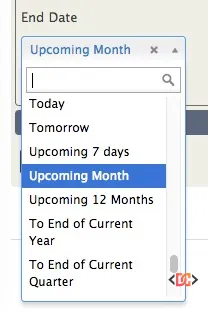
As the platform matured, the community moved toward more precise terminology. For instance, "Upcoming Month" was replaced with "Next 30 Days" in newer versions. This change was crucial because "Upcoming Month" provides inconsistent results depending on whether you are in February (28 days) or August (31 days). Modern CiviCRM relative dates prioritize consistency, ensuring your Smart Groups remain accurate regardless of the calendar month.
Using hook_civicrm_relativeDate (CiviCRM 6.5+)
The most robust and recommended way to add custom date ranges is by using hook_civicrm_relativeDate. Introduced in CiviCRM 6.5, this hook allows developers to programmatically define new options that will appear in the search dropdowns throughout the system.
Here is a practical example of how to implement a "Next 60 Days" filter within a custom extension:
/**
 * Implements hook_civicrm_relativeDate().
 *
 * @param array $relativeDateFilters
 */
function myextension_civicrm_relativeDate(&$relativeDateFilters) {
  $relativeDateFilters['next_60_days'] = [
    'label' => ts('Next 60 days'),
    'from' => 'now',
    'to' => '+60 days',
  ];

  $relativeDateFilters['last_14_days'] = [
    'label' => ts('Last 14 days'),
    'from' => '-14 days',
    'to' => 'now',
  ];
}
How the Hook Works
- Key Name: The array key (e.g.,
next_60_days) serves as the unique identifier for your filter. - Label: This is the string that users will see in the Advanced Search dropdown. Always wrap this in the
ts()function to ensure it can be translated. - From/To: These fields accept standard PHP relative date strings (like
now,+1 month,-30 days, orfirst day of this month). CiviCRM uses these to calculate the actual date range at the moment the search is executed.
Why Precision Matters in Date Ranges
When defining custom ranges, it is important to consider the logic of your search. A common pitfall for CiviCRM administrators is using "Month" based logic for critical financial or membership reports.
Consider the difference between "Next Month" and "Next 30 Days": - Next Month: Often interpreted as the first day of the next calendar month to the last day of the next calendar month. - Next 30 Days: A rolling window starting from today and extending exactly 30 days into the future.
For automated renewal reminders, a rolling window (e.g., "Next 60 Days") is almost always preferable because it ensures no contacts are missed during the transition between calendar months.
Legacy Methods and Version Context
Before the introduction of hook_civicrm_relativeDate, developers often had to maintain local copies of core files in a PHP override folder. While this was a functional workaround, it created significant technical debt during CiviCRM upgrades. If you are still running an older version of CiviCRM (pre-6.5), you may find that your options are limited to what is available in the core metadata or through direct template modifications.
If you find yourself on an older version, the best path forward is to plan an upgrade to at least 6.5. This unlocks the ability to use hooks, making your customizations "upgrade-safe" and significantly easier to maintain.
Frequently Asked Questions
Can I remove default date ranges that my organization doesn't use?
Yes. Because hook_civicrm_relativeDate passes the $relativeDateFilters array by reference, you can use unset($relativeDateFilters['key_name']) to remove standard options and declutter the UI for your users.
Do these custom dates work in SearchKit?
Yes! CiviCRM’s modern search tools, including SearchKit and the APIv4, respect the relative date filters defined via hooks. This makes it easy to build complex dashboards and displays using your custom timeframes.
Will my custom relative dates work in Smart Groups?
Absolutely. When you save a search as a Smart Group using a relative date, CiviCRM stores the relative logic (e.g., "+60 days") rather than the static date. Every time the group is accessed, the date range is recalculated based on the current time.
Wrapping Up
Customizing relative date ranges is one of the most effective ways to tailor CiviCRM to your organization's specific workflows. By leveraging hook_civicrm_relativeDate, you can move beyond the standard "Last Year" or "Next Month" options and provide your staff with the exact filters they need to manage memberships, contributions, and activities efficiently.
Remember to prioritize rolling day-based windows (like "30 days") over calendar-based windows ("Month") for higher precision, and always test your new filters in a sandbox environment before deploying them to your production Smart Groups.