
For many non-profits and membership-based organizations, financial predictability is everything. One of the most common requests for CiviCRM administrators is the ability to synchronize all recurring membership payments to a specific day—usually the 1st of the month. This alignment simplifies accounting, makes revenue forecasting more accurate, and streamlines the process of following up on failed payments.
By default, CiviCRM typically initiates a recurring contribution on the day the user signs up. If a member joins on the 14th, their subsequent payments will occur on the 14th of every month. However, depending on your payment processor and your CiviCRM configuration, you can override this behavior. In this guide, we will explore how to set a recurring membership start date to the 1st of the month using various tools and extensions.
Understanding the Relationship Between Memberships and Contributions
To solve the problem of billing dates, you must first understand how CiviCRM handles memberships. A recurring membership in CiviCRM is not a standalone entity; it is driven by a ContributionRecur record.
When a user signs up for a membership with a recurring payment, CiviCRM creates a membership record and links it to a recurring contribution record. The payment processor (like Stripe or Authorize.net) is responsible for the actual scheduling. Therefore, to change the billing date, you must change how the recurring contribution is communicated to the payment processor.
If your payment processor’s API supports a "future start date," CiviCRM can tell the processor: "Take the first payment today, but schedule all future monthly payments for the 1st of the next month."
Option 1: Using the Stripe Integration (Recommended)
If you are using the Stripe payment processor extension, you are in luck. As of the Stripe 6.5 release, a specific feature was added to address this exact requirement. This is currently the most robust and user-friendly way to achieve fixed-date billing.
Within the Stripe extension settings, you can find options to restrict or set the day of the month for recurring contributions. This was developed to allow organizations to standardize their billing cycles without needing custom code for every transaction.
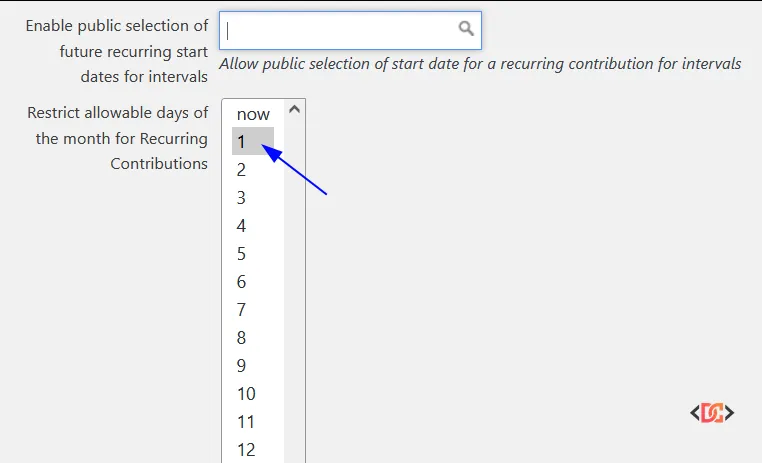
How to Configure Stripe for the 1st of the Month
- Ensure you are running Stripe Extension version 6.5 or higher.
- Navigate to the payment processor settings in CiviCRM.
- Look for the "Recurring Start Day" or similar configuration field introduced in the update.
- Set the value to "1" to ensure the schedule aligns with the first of the month.
Option 2: The iATS Payments Extension
For organizations using iATS Payments, the functionality to restrict recurring dates is built directly into the extension. iATS has long supported "fixed-day" billing, allowing you to specify which days of the month are allowable for recurring contributions.
When configured, the user-facing contribution form will either default to the allowed date or provide a dropdown for the user to select from the dates you have approved. If you only allow the 1st, the system will handle the scheduling logic with the iATS gateway accordingly.
Option 3: Custom Extension Logic (The Developer Approach)
If you are using a processor like Authorize.net that does not natively expose these settings in the CiviCRM UI, you may need a custom extension. A community-maintained extension, ca.civicrm.contributionrecur, was designed specifically to bridge this gap.
This extension allows you to restrict which dates are allowable for recurring contributions across different processors. While it was originally tested with specific gateways, it can often be adapted for Authorize.net with minor patches.
How the Logic Works
To implement this via code, you would typically use the civicrm_pre or civicrm_post hooks to intercept the creation of a ContributionRecur record.
// Example logic concept for a custom extension
function myextension_civicrm_alterPaymentProcessorParams($paymentObj, &$rawParams, &$params) {
  // Check if this is a recurring contribution
  if (!empty($params['is_recur'])) {
    // Calculate the 1st of the next month
    $nextMonth = new DateTime('first day of next month');
    // Pass the start date to the processor if supported
    $params['start_date'] = $nextMonth->format('YmdHis');
  }
}
Note: Not all payment processors support the start_date parameter. You must verify the API documentation for your specific gateway (e.g., Authorize.net ARB API) to ensure it can accept a future start date for a new subscription.
Common Pitfalls and Best Practices
1. The Pro-Rating Dilemma
If a member joins on the 20th of the month but you don't bill them again until the 1st of the following month, they are essentially getting 10 days of membership for a different price point (or for free, depending on your setup).
Best Practice: Decide whether you want to charge a pro-rated amount for the first month or if the first payment should be a full monthly fee that simply sets the "anchor" date for future payments. Most CiviCRM setups charge the full initial amount immediately and then set the recurring schedule for the 1st of subsequent months.
2. Processor Limitations
Some older versions of the Authorize.net integration do not easily allow for "delayed" recurring starts via the standard CiviCRM interface.
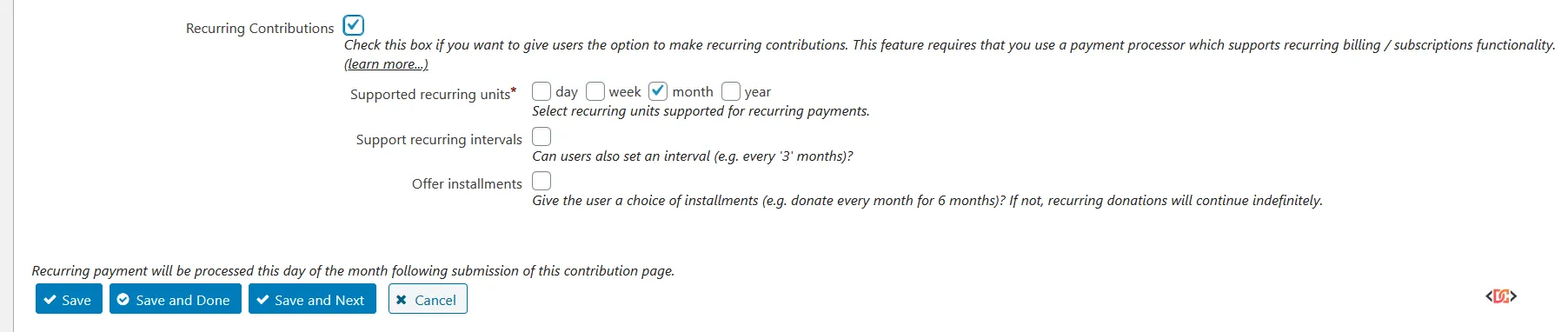
As seen in the image above, while the interface might suggest the potential for setting dates, the underlying API connection must support it. If you find your settings are being ignored, it is likely because the payment processor extension is not passing the start_date variable to the gateway's API.
3. Testing with Sandboxes
Never implement recurring date changes directly in production. Recurring billing logic is notoriously difficult to "undo" once a subscription is created in a gateway like Stripe or Authorize.net. Use a developer sandbox to ensure that the ContributionRecur record in CiviCRM matches the Subscription record in your payment portal.
Frequently Asked Questions
Does CiviCRM support pro-rating memberships automatically?
CiviCRM does not have a native "pro-rate" button for memberships. To achieve this, you would typically use an extension or custom code to calculate the difference between the signup date and the 1st of the month, adjusting the initial contribution amount accordingly.
What happens if I change the start date in CiviCRM but not in the Payment Processor?
This will cause a synchronization error. CiviCRM will expect a payment on the 1st, but the processor will send a notification (IPN/Webhook) on a different day. This often results in memberships falling into "Pending" or "Grace" status because CiviCRM cannot match the incoming payment to the expected schedule.
Can I move existing recurring members to the 1st of the month?
Moving existing members is significantly harder than setting the date for new members. It usually requires canceling the existing subscription in the payment gateway and creating a new one, as most gateway APIs do not allow you to change the billing cycle date once a subscription has started.
Wrapping Up
Setting recurring memberships to the 1st of the month is a powerful way to organize your non-profit's finances. If you are starting fresh, using the Stripe extension (v6.5+) is the most straightforward path. For those on other processors, exploring the ca.civicrm.contributionrecur extension or implementing a custom hook is the way to go.
Always remember that the membership is the "what" and the recurring contribution is the "when." Master the ContributionRecur record, and you will have full control over your organization's billing cycle.