
Managing volunteer data or organizational affiliations in CiviCRM often requires looking backward. While it is easy to find who is currently a volunteer, you may frequently need to answer a more complex question: "Which contacts were active volunteers during the last fiscal year?"
Searching for active relationships within a specific date range is a common challenge for CRM administrators. Because relationships in CiviCRM can have a start date, an end date, or neither, the logic required to capture every relevant contact can be surprisingly nuanced. Whether you are preparing an annual report or auditing participation, understanding how to filter these date ranges effectively is essential.
In this guide, we will explore several methods to identify these contacts, ranging from modern Search Kit techniques to advanced logical filtering and reporting.
The Logic of "Active" Relationships
Before diving into the tools, we must define what makes a relationship "active" during a specific period (let's call this the "Target Range"). To get a complete list, you must account for four distinct scenarios regarding start and end dates.
Scenario A: Defined Start and End Dates
This is the most straightforward case. A relationship was active if the start date occurred before your Target Range ended, and the end date occurred after your Target Range began.

Scenario B: Open-Ended Relationships
Many relationships have a start date but no end date (meaning they are ongoing). These are active if the start date is before your Target Range ends.

Scenario C: Undefined Start Dates
If a relationship has no start date but has an end date, it is considered active if the end date falls after your Target Range begins.

Scenario D: Fully Undefined Dates
If both the start and end dates are empty, CiviCRM treats the relationship as indefinitely active. These contacts should almost always be included in your results.

Method 1: The Modern Approach with Search Kit
Search Kit is now the most powerful and flexible way to handle complex relationship queries. It allows you to build the "OR" logic necessary to capture all four scenarios mentioned above in a single search.
To find active volunteers in the past year using Search Kit: 1. Navigate to Search > Search Kit and create a new search. 2. Select Contacts as the primary entity and join it to Contact Relationships. 3. In the "Where" clause, filter by the specific Relationship Type (e.g., "Volunteer For"). 4. Add a group of filters using the OR operator to cover the date logic. Your filters should look like this: * (Relationship Start Date <= 'End of Last Year' OR Relationship Start Date IS NULL) * AND * (Relationship End Date >= 'Start of Last Year' OR Relationship End Date IS NULL)
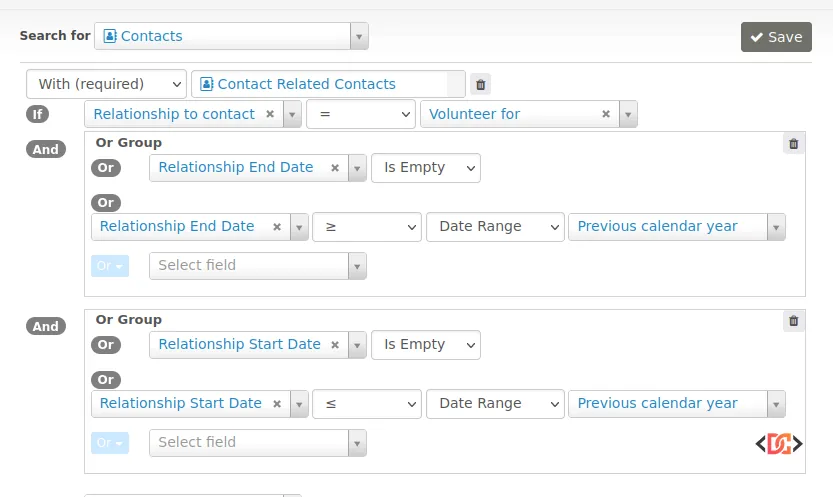
Using Search Kit is the recommended method for modern CiviCRM installations (version 5.x and above) because it allows you to save the search as a Smart Group or export the data directly to a spreadsheet.
Method 2: Advanced Search and Smart Groups
If you are working on an older version of CiviCRM or prefer the Advanced Search interface, you can achieve similar results by nesting Smart Groups. Since Advanced Search struggles with complex "AND/OR" combinations in a single pass, you can break the task into smaller pieces.
Step 1: Create an "Active Now" Smart Group
Search for contacts with the relationship type "Volunteer For" where the status is "Active." Do not specify dates. This captures everyone who is currently in the system as an ongoing volunteer.
Step 2: Create a "Recently Inactive" Group
Perform a search for the relationship type "Volunteer For" where the status is "Inactive" and the End Date falls within your target range (e.g., Jan 1, 2023 - Dec 31, 2023).
Step 3: Combine with an OR Search
Use the "Search Builder" or the "OR" checkbox in Advanced Search to find contacts who are in either the "Active Now" group or the "Recently Inactive" group. This will give you a comprehensive list of anyone who held that role during your specified window.
Method 3: The Relationship Contact Report
Sometimes, a search isn't the best tool for the job. The built-in Relationship Contact Report often includes more robust date filtering than the standard Advanced Search screen.
One significant advantage of the Relationship Contact Report is that it natively supports the "Is Empty" (NULL) operator for date fields. You can set the filters to include relationships where the end date is after a certain point OR where the end date is empty.
To find this report, navigate to Reports > Contact Reports > Relationship Report. If it doesn't meet your needs out of the box, you can often find extended versions of these reports in community extensions like the "Extended Reports" (com.jprostko.extendedreports) extension.
Alternative Indicators of Activity
If your relationship data is messy or inconsistent, you might consider looking at other activity markers to supplement your search. A contact might be an "active volunteer" in practice, even if their relationship record hasn't been updated.
You can search for: - Activities: Look for contacts with "Volunteer" activity types completed within the last year. - Event Participants: Look for contacts who attended events with a specific role (e.g., "Staff" or "Volunteer"). - Contributions: If your volunteers are also donors, financial activity can be a proxy for engagement.
Combining these searches with your relationship query ensures that no one falls through the cracks due to administrative oversight.
Frequently Asked Questions
How does CiviCRM handle "Active" vs "Inactive" relationship statuses?
CiviCRM automatically toggles relationship status based on the current date and the start/end dates. However, if you are searching for a past date range, the "Current" status filter may not be useful. You should rely on the specific date fields instead of the status field when looking at historical data.
Can I use Search Kit to find relationships that lasted a specific duration?
Yes. Search Kit allows you to use calculated fields. You can create a field that subtracts the Start Date from the End Date to find volunteers who served for a specific number of days or months.
Why are my relationship searches returning duplicate contacts?
If a contact has had multiple volunteer stints (e.g., they volunteered in 2021, stopped, and started again in 2023), they will appear twice in relationship-based searches. In Search Kit, you can use the "Group By" feature on the Contact ID to ensure each person only appears once in your list.
Wrapping Up
Tracking historical relationship data requires a shift from simple filtering to logical date math. By accounting for null start and end dates, you can ensure your reports accurately reflect your organization's impact.
For most users, Search Kit is the most efficient path forward. It provides the logical flexibility needed to handle all relationship scenarios in one place. If you are on an older version of CiviCRM, utilizing the Relationship Contact Report or nesting Smart Groups provides a reliable fallback.
Always remember to verify your data hygiene—consistent use of start and end dates makes these searches significantly easier to manage in the long run.