
When building complex Joomla components, you often need to create Search Engine Friendly (SEF) URLs that go beyond basic views. If you have ever used Route::_() only to find that Joomla redirects you to the wrong menu item, you aren't alone. This common hurdle occurs because the default Joomla router logic is designed for simplicity, often settling for the first menu item that matches the component and view, regardless of additional query parameters.
In this guide, you will learn why this happens and how to implement a custom MenuRules class to ensure your component handles specific parameters like extension, category_id, or custom filters with precision.
Understanding How Joomla Matches Menu Items
Joomla's routing system is built to transform internal URLs (like index.php?option=com_content&view=article&id=1) into human-readable paths. When you call Route::_(), the system looks through your site's menu items to find the best match.
By default, the core MenuRules class looks for two primary things:
1. The option (e.g., com_mycomponent)
2. The view (e.g., categories)
If you have two different menu items that both point to the categories view but use different query parameters—such as extension=com_countries and extension=com_diseases—Joomla's default behavior is to pick the first one it finds in the database.
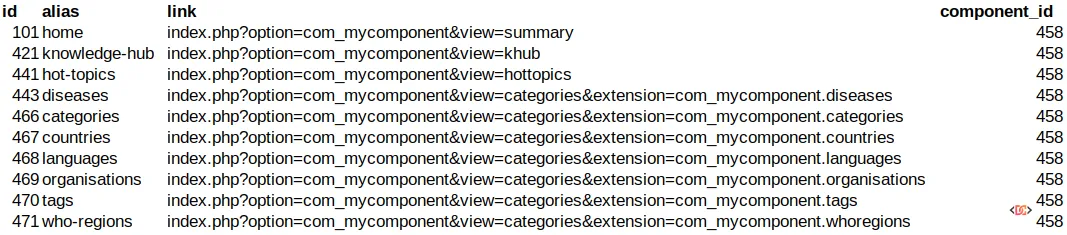
As seen in the example above, if you attempt to route to index.php?option=com_mycomponent&view=categories&extension=com_mycomponent.countries, the router might incorrectly return the URL for /diseases simply because that menu item appeared first in the lookup. This is because the core router does not "know" that extension is a critical variable for your menu selection.
The Solution: Overriding MenuRules
To fix this, you need to tell the Joomla Router that your specific query parameters are just as important as the view. The most robust way to achieve this is by overriding the MenuRules class within your component's router.
While it might seem like overkill for a single parameter, this is actually the intended architectural approach in Joomla 4.x and 5.x. Even core components occasionally face this limitation, and the API is explicitly designed to allow developers to inject custom logic into the routing process.
Step 1: Create Your Custom Rule Class
You need to create a class that extends Joomla\CMS\Component\Router\Rules\MenuRules. In this class, you will override the lookup() method to include your custom parameters in the search criteria.
namespace MyNamespace\Component\MyComponent\Site\Service\Router\Rules;

use Joomla\CMS\Component\Router\Rules\MenuRules as CoreMenuRules;
use Joomla\CMS\Menu\MenuItem;

class MyComponentMenuRules extends CoreMenuRules
{
    /**
     * Custom lookup to include 'extension' parameter
     */
    protected function lookup(array &$query, $menu)
    {
        // Get the items that match the basic component/view
        $items = parent::lookup($query, $menu);

        // If we have a specific parameter we need to match, filter the results
        if (isset($query['extension'])) {
            foreach ($items as $id => $item) {
                // Check if the menu item's query contains our extension
                if (!isset($item->query['extension']) || $item->query['extension'] !== $query['extension']) {
                    unset($items[$id]);
                }
            }
        }

        return $items;
    }
}
Step 2: Register the Rule in Your Router
Once you have defined your custom rule, you must tell your component's Router to use it instead of the default one. This is typically done in your Router class (usually located in src/Service/Router.php).
public function __construct(SiteApplication $app, AbstractMenu $menu, CategoryFactoryInterface $categoryFactory, DatabaseInterface $db)
{
    parent::__construct($app, $menu);

    // Remove the default MenuRules
    // Then add your custom version
    $this->addRule(new MyComponentMenuRules($this));

    // Add other standard rules like NomenuRules and StandardRules
    $this->addRule(new StandardRules($this));
}
Why This Approach Works
By overriding the lookup method, you are effectively narrowing the search results. The parent lookup method returns all menu items matching the component and view. Your custom logic then iterates through those items and discards any that don't match your specific extension parameter.
This ensures that when you call:
Route::_('index.php?option=com_mycomponent&view=categories&extension=com_mycomponent.countries')
The router now sees that the /diseases menu item (which has extension=com_mycomponent.diseases) is not a valid match, and it continues searching until it finds the correct /countries menu item.
Common Mistakes to Avoid
- Hardcoding IDs: Never hardcode menu item IDs in your router. Always use the query parameters to find the correct item dynamically to ensure your component remains portable.
- Performance Overheads: If your component has thousands of menu items, iterating through them in the router can be slow. However, for most sites, the
parent::lookupmethod already filters the list significantly, so the performance impact is negligible. - Namespace Conflicts: Ensure your custom rule class is correctly namespaced according to Joomla 4/5 PSR-4 standards, or the autoloader will fail to find your class.
Frequently Asked Questions
Can I just use a custom Router string instead?
While you can manually manipulate strings, it is not recommended. Using the Router API ensures that if a user changes a menu alias in the backend, your internal links will update automatically. Manual string manipulation breaks the core benefit of Joomla's SEF system.
Does this work in Joomla 5?
Yes. The routing architecture in Joomla 5 remains largely consistent with Joomla 4. The use of Rules and the Router service is the standard for both versions.
What if I have multiple custom parameters?
You can extend the if logic in your custom lookup method to check for any number of parameters, such as layout, lang, or custom IDs. Simply ensure that the variables you are checking are part of the menu item's configuration.
Wrapping Up
Properly handling custom query parameters is essential for any professional Joomla extension. By moving beyond the basic core routing and implementing a custom MenuRules class, you gain full control over how your URLs are generated. This leads to better SEO, a more predictable user experience, and a cleaner codebase.
Always remember to check your routing logic against the latest Joomla documentation, as the platform continues to evolve its service-oriented architecture. Happy coding!